TChain: An n-tuple in multiple files
In ROOT, it’s possible to distribute a single n-tuple or TTree
across many files. Typically you’d need this when you’re running batch
jobs (as described in Batch Systems), perhaps thousands of
them, each of which independently creates a file containing an n-tuple with
the same name and structure.
Within a single program, you can read all these files as if they
were one continuous TChain using the name of the TChain::Add method to define all the files that are part of the
chain.
Here’s an example: Suppose instead of the single file experiment.root
that we used in the Walkthroughs and Exercises, the experiment0.root,
experiment1.root, experiment2.root, and so on through
experiment9.root. They’d all contain the tree1 with
the same variables, but with different values. We could then define a
chain by:
auto tree1 = new TChain("tree1");
tree1->Add("experiment0.root");
tree1->Add("experiment1.root");
// ... and so on
tree1->Add("experiment9.root");
mychain = ROOT.TChain("tree1")
mychain.Add("experiment0.root")
mychain.Add("experiment1.root")
# ... and so on
mychain.Add("experiment9.root")
Note that in the example scripts given earlier in the tutorial (here
are the C++ and Python versions), these TChain definitions would
replace the use of the TFile to define the
In The RDataframe Path, after you’ve defined the TChain as above, you
can just supply the name of the chain as an argument to RDataFrame;
e.g.,
auto dataframe = ROOT::RDataFrame(tree1);
or
dataframe = ROOT.RDataFrame(mychain)
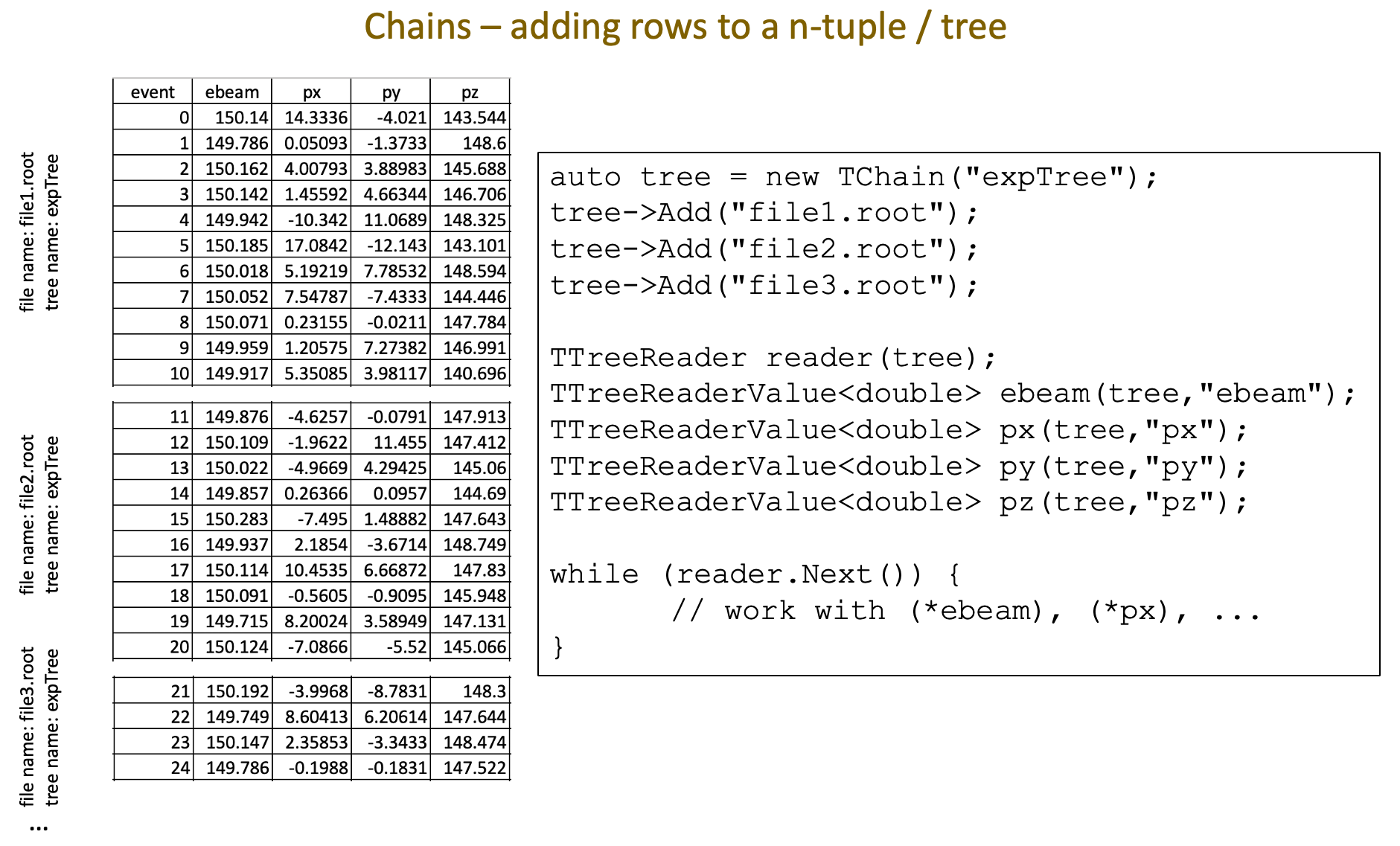
Figure 69: This diagram may clarify what a ROOT Chain does. In this example, the TTree
expTree is distributed between three different files: file1.root,
file2.root, and file3.root. Because this is a slide from a C++
talk, the example code uses TTreeReader
to access the columns of the
The above code is fine if you only have a few files to add to the chain,
though doing the copy-and-pasting of the lines for all those
experimentN.root files would be a bit tedious. But what if
you’ve got thousands of files? Fortunately, you don’t have to specify
each one of them in your program.
TChain::Add can accept some wildcard characters to
match against file names. The wildcard you’ll probably find to be the
most useful is *, which matches any sequence of characters
(including none). So you can do something like this:
mychain.Add("experiment*.root")
Note that this would also match experiment.root and
experiment-test.root, which may not be what you want.
If you’ve learned enough programming to create loops and manipulate strings, you can also do something like this:
auto tree1 = new TChain("tree1");
for ( int i = 0; i < 10; ++i ) {
    std::string filename = "experiment" + std::to_string(i) + ".root";
    tree1->Add(filename.c_str());
}
mychain = ROOT.TChain("tree1")
for i in range(10):
    filename = "experiment" + str(i) + ".root"
    mychain.Add(filename)
Extending these simple examples to thousands of files is left as an exercise for the student.
Another approach would be to store the names of the ROOT files in a
text file (or even another
Figure 70: https://xkcd.com/1579/ by Randall Munroe
- 1
If you clicked on that
TChainlink, you’ll see another important ROOT class whose documentation is sorely lacking. I suggest doing a search within the ROOT tutorials to see some examples ofTChainin use:cd `root-config --tutdir` grep -rli tchain *
Another tangent:
grep is a program that interprets regular expressions (also known as “regexes”), a powerful method for searching, replacing, and processing text. More sophisticated programs that use regular expressions include sed, awk, and perl; there are also regex libraries in Python and C++.
Regexes are used in manipulating text, not numerical calculations. Their deep nitty-gritty is rarely relevant in physics. On the other hand, I use them all the time; e.g., searching the ROOT tutorials for hints.
Regular expressions are a complex topic, and it can take a lifetime to learn about them. (I’ve lost track of the number of your lifetimes I’ve spent. You’re probably tired of the joke anyway.)
There’s a cool xkcd cartoon about regular expressions. It’s too big to put into a footnote, so you’ll have to click on the link yourself: https://xkcd.com/208/